Getting Started with Cave
What is Cave?
Cave is a CLI (Command Line Interface) tool designed for CSC207 students to help structure, visualize, and verify clean architecture in their Java projects.
Prerequisites
- Node.js version 20.0 or above
- A CSC207 Java project (or let Cave create one for you!)
Commands
cave init <language>
Initializes your CSC207 project with a sample clean architecture directory structure in the chosen programming language.
cave init <language>
The created structure should look like:
src/
├── main/
│   └── java/
│       ├── app/
│       ├── use_case/
│       ├── entity/
│       ├── interface_adapter/
│       ├── data_access/
│       └── view/
└── test/
    └── java/
Run this first in your project folder. Cave will scaffold the recommended folder layout so you can start developing! These folders will not immediately be tracked by git as they are empty.
cave module_init <language>
Initializes your CSC207 project with a sample clean architecture directory structure in the chosen programming language, packaged by module.
cave module_init <language>
The created structure should look like:
src/
├── main/
│   └── java/
│       ├── app/
│       ├── entity/
│       ├── features/
│       ├── data_access/
│       └── view/
└── test/
    └── java/
Run this first in your project folder. Cave will scaffold the recommended folder layout so you can start developing! These folders will not immediately be tracked by git as they are empty.
cave usecase <usecasename>
Initializes the folders and file structure for a new use case.
cave usecase <usecasename>
Replace <usecasename> with the name of your use case. Cave will generate the appropriate directories and boilerplate files following clean architecture conventions similar to the structure shown below (assume we initialize a Java project):
src/main/java/use_case/
└── <usecasename>/
    ├── <usecasename>InputBoundary.java
    ├── <usecasename>InputData.java
    ├── <usecasename>Interactor.java
    ├── <usecasename>OutputData.java
    └── <usecasename>OutputBoundary.java

src/main/java/interface_adapter/
└── <usecasename>/
    ├── <usecasename>Controller.java
    └── <usecasename>Presenter.java
cave feature <featurename>
Initializes the folder for a new feature. This only works on projects packaged by module.
cave module_usecase <featurename> <usecasename>
Replace <featurename> with the name of your feature. Cave will generate the appropriate directory as shown below (assume we initialize a Java project):
src/main/java/features
└── <featurename>
cave module_usecase <featurename> <usecasename>
Initializes the folders and file structure for a new use case, in the specified feature, in a project packaged by module.
cave module_usecase <featurename> <usecasename>
Replace <featurename> with the name of your feature. Replace <usecasename> with the name of your use case. Cave will generate the appropriate directories and boilerplate files following clean architecture conventions similar to the structure shown below (assume we initialize a Java project):
src/main/java/features/<featurename>/use_case/
└── <usecasename>/
    ├── <usecasename>InputBoundary.java
    ├── <usecasename>InputData.java
    ├── <usecasename>Interactor.java
    ├── <usecasename>OutputData.java
    └── <usecasename>OutputBoundary.java

src/main/java/features/<featurename>/interface_adapter/
└── <usecasename>/
    ├── <usecasename>Controller.java
    └── <usecasename>Presenter.java
cave start
Starts the front end visualizer so you can explore the interactions in your codebase.
cave start
This will open your browser to http://localhost:5173 to view your project's adherence to clean architecutre.
cave verify
Verifies your project's adherence to clean architecture — no need to open the front end.
cave verify
cave end
Ends the project by closing the server and cleaning up the database.
cave end
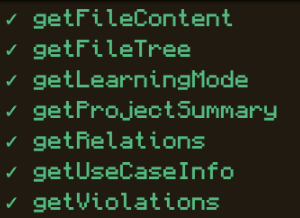
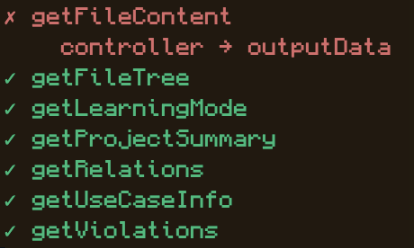
Cave will analyze your project and report any violations of clean architecture principles directly in your terminal.
Clean project output:
Project with a violation:
Quick Start
A quick run through of how you can get your project started:
cave init                  # Set up your project structure
cave usecase MyFirstUseCase  # Set up the file strucutre of your first use case
Once you have written a use case you can then run:
cave start
to open the frontend to visualize how the dependencies in your project interact with one another.
If you are a Windows user, at the moment, running:
cave verify
may result in the friendliest user experience.